Captions for every voice.Make your event inclusive.
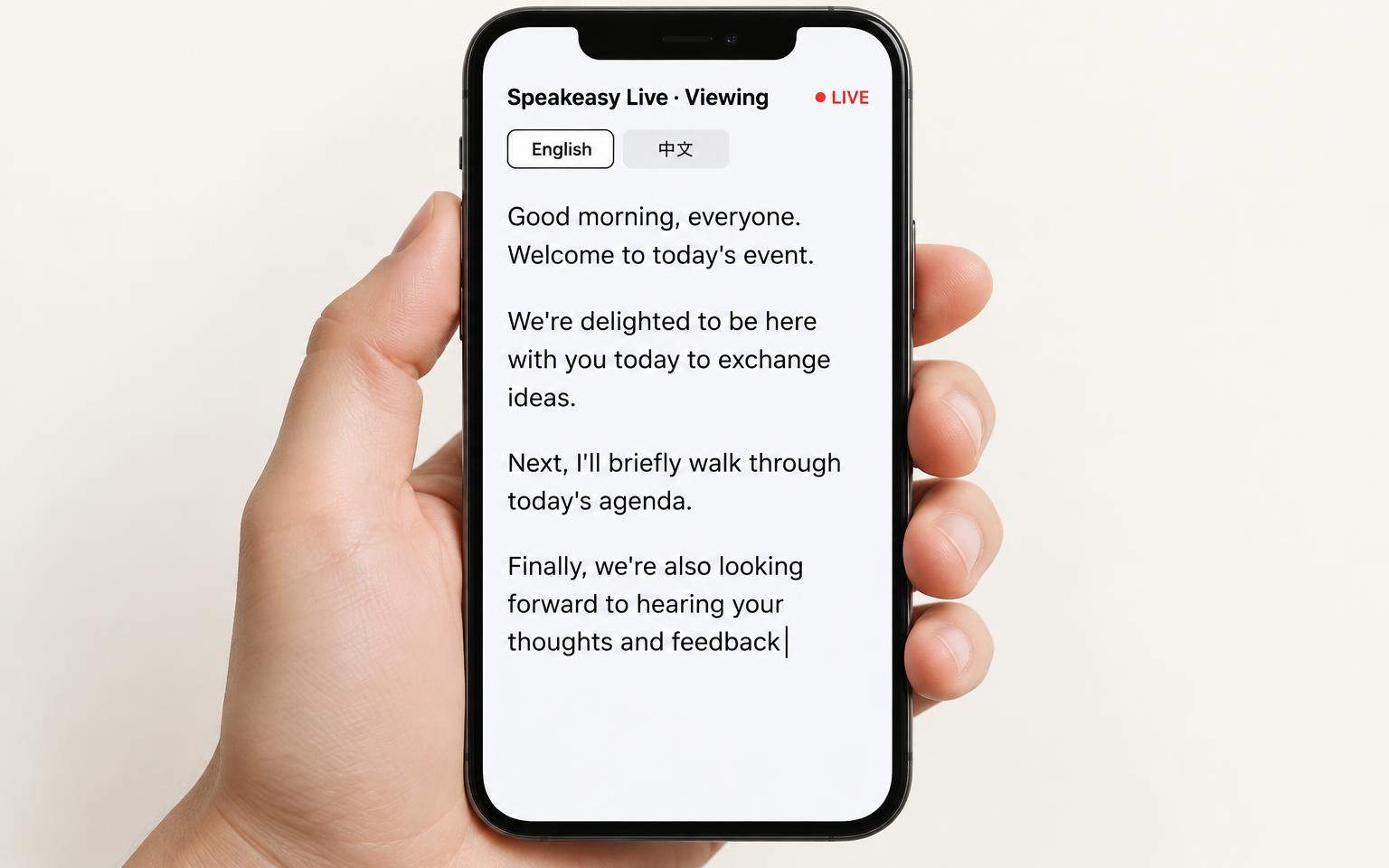
Turn speech into translated captions in real time. Pick two languages, capture from your microphone or a browser tab, and share a QR code so attendees can follow on their own phones. No app install needed; it runs in the browser.
“
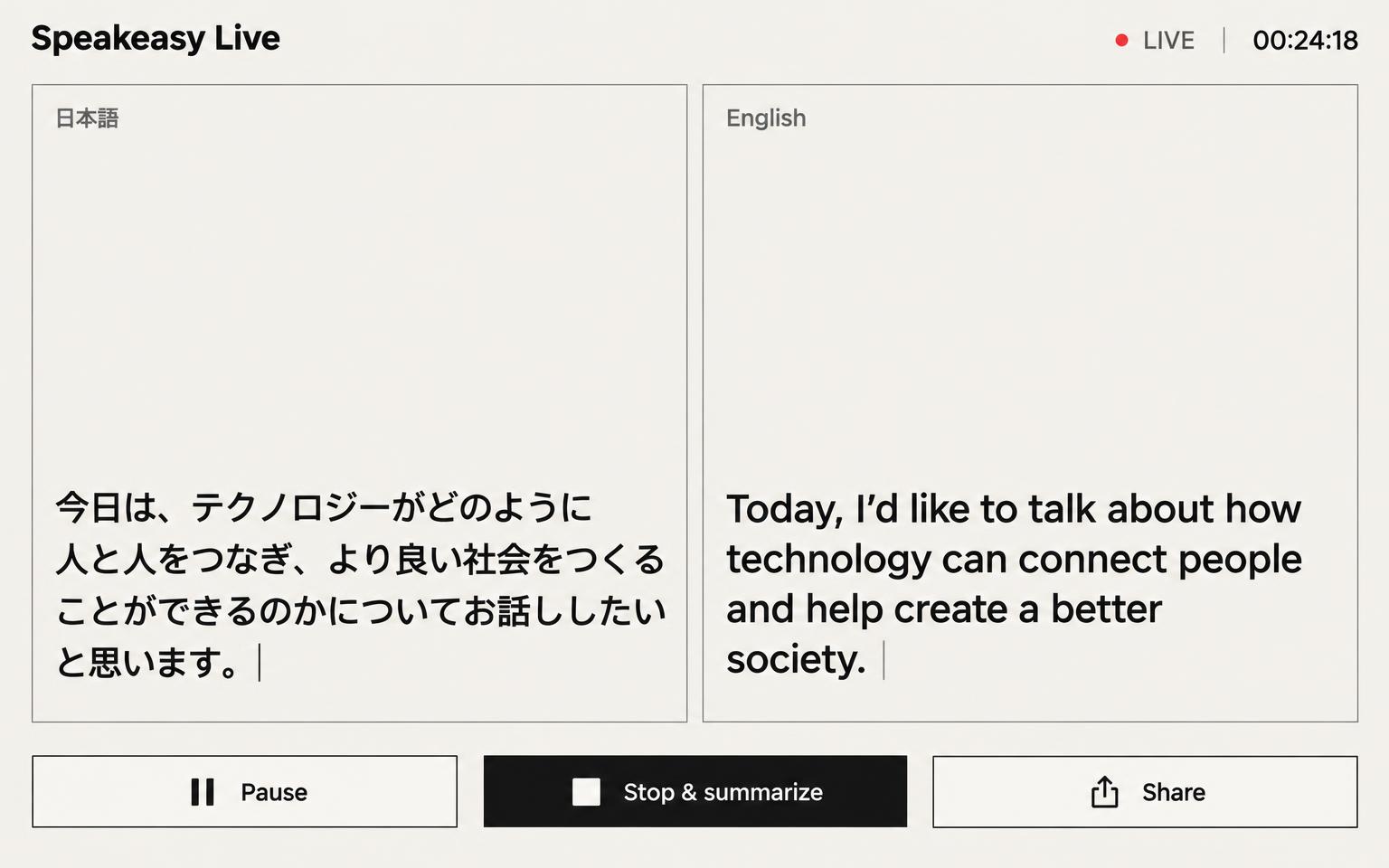
本日の年次グローバル・サミットに皆様をお迎えします。
欢迎大家参加我们的年度全球峰会。
Start translating in seconds.
1. Pick your audio source
Use your microphone, share a browser tab, or combine both. Lock the spoken language if speakers mix languages.
2. Pick up to two of 70+ languages
Choose a primary and secondary language from 78 options. They show side by side at the same size, and your choices are saved for next time.
3. Share, adjust, summarize & export
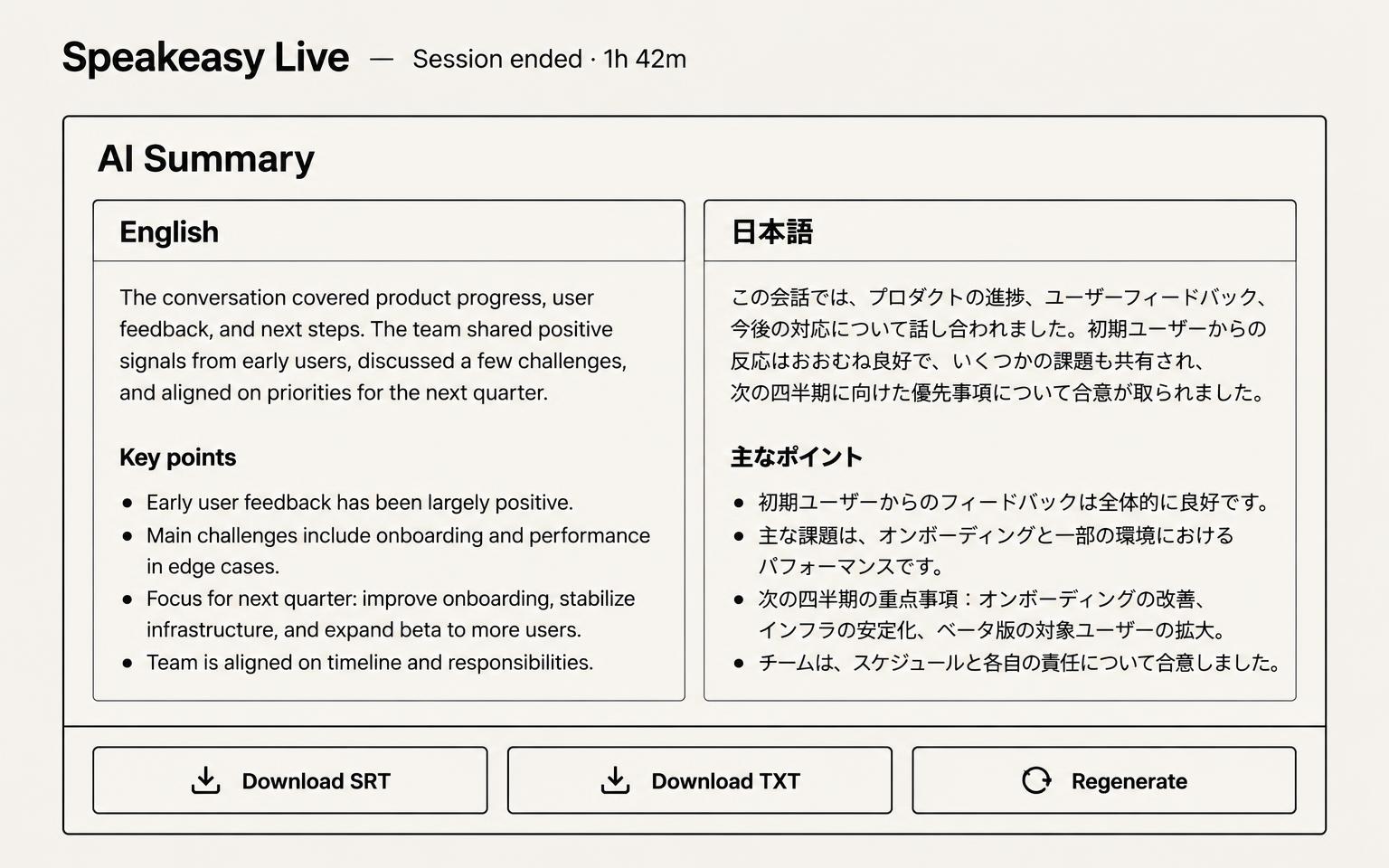
Your attendee QR code is ready instantly. Switch layout or text size mid-session, get an AI summary in both chosen languages, and download the transcript as plain text or SRT. Everything is saved locally on your device.
A quick tour of Speakeasy Live.
Built for real events.
Shared screen + captions
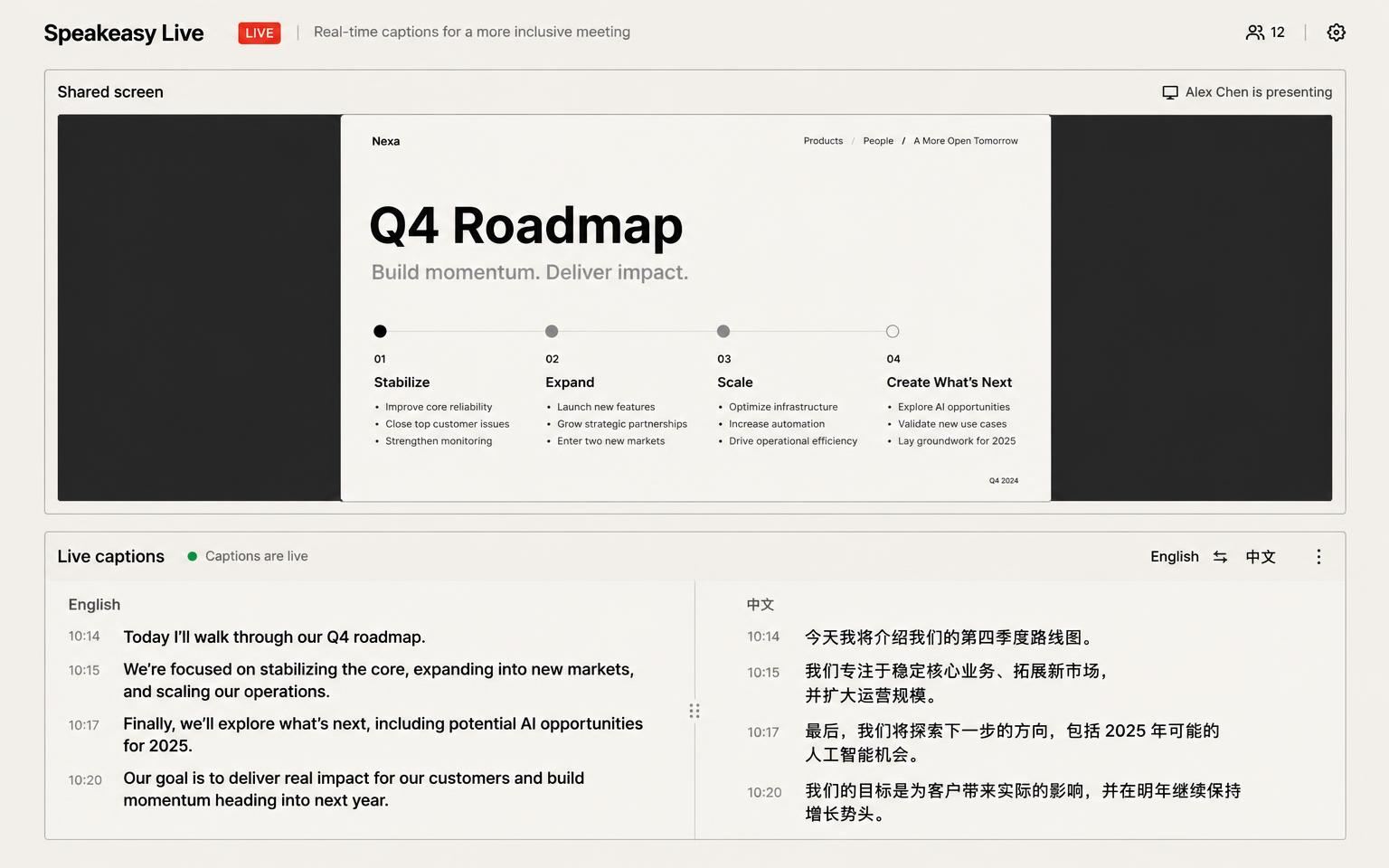
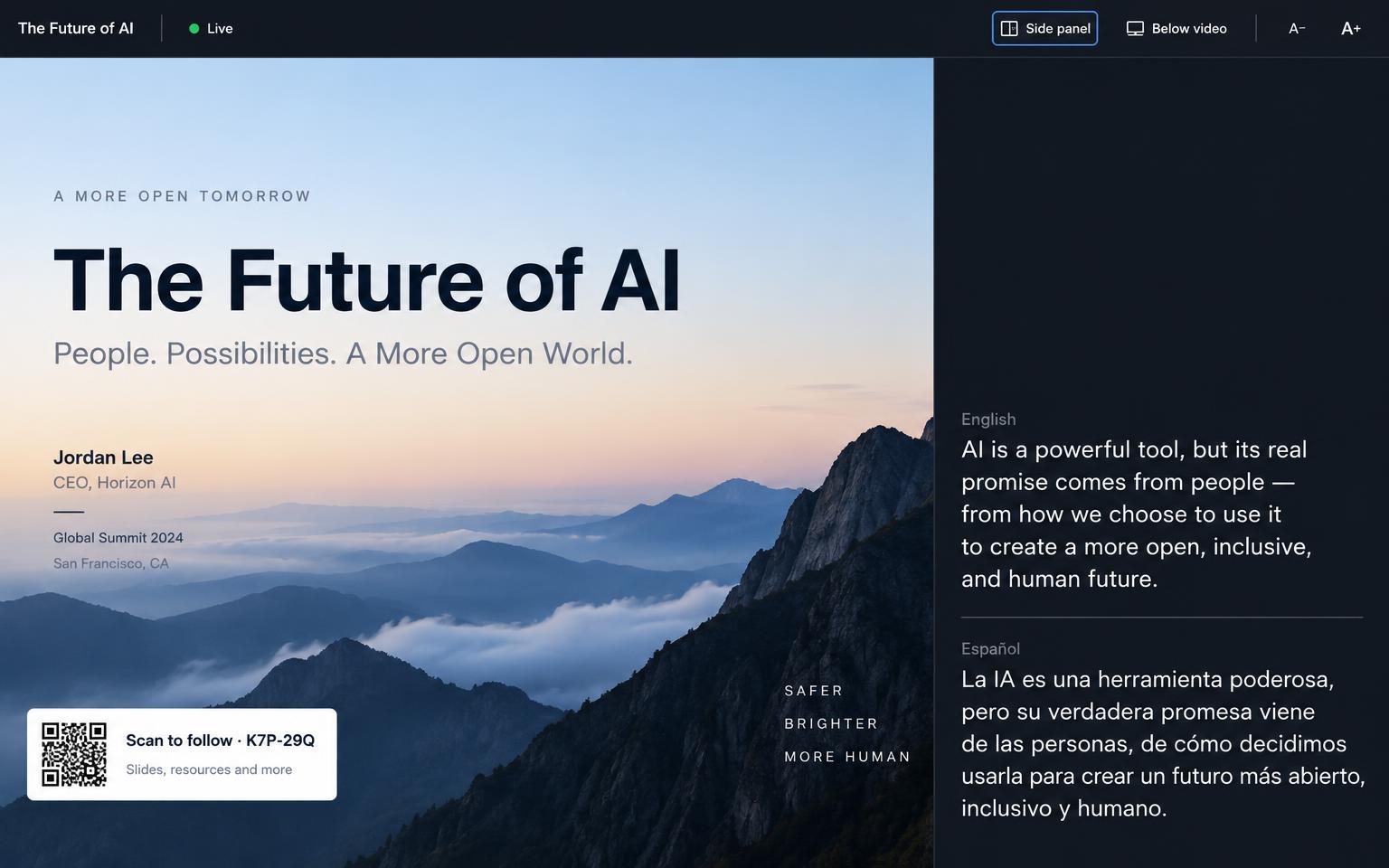
See the shared tab above the transcript. Fullscreen puts captions beside or below the screen, both resizable, with the attendee QR code and a hideable control bar.
Mic, tab, or both
Capture room audio, a shared browser tab, or mix both. If Chrome cannot pick up tab audio because it is routed to a Bluetooth speaker, the microphone can take over.
Two languages at once
Show a primary and secondary translation side by side at the same size, with the newest sentences lined up on the same row.
78 languages
Mandarin, Cantonese, Japanese, Spanish, French, Arabic, Burmese and many more. Every language the live translation model supports.
Audience QR sharing
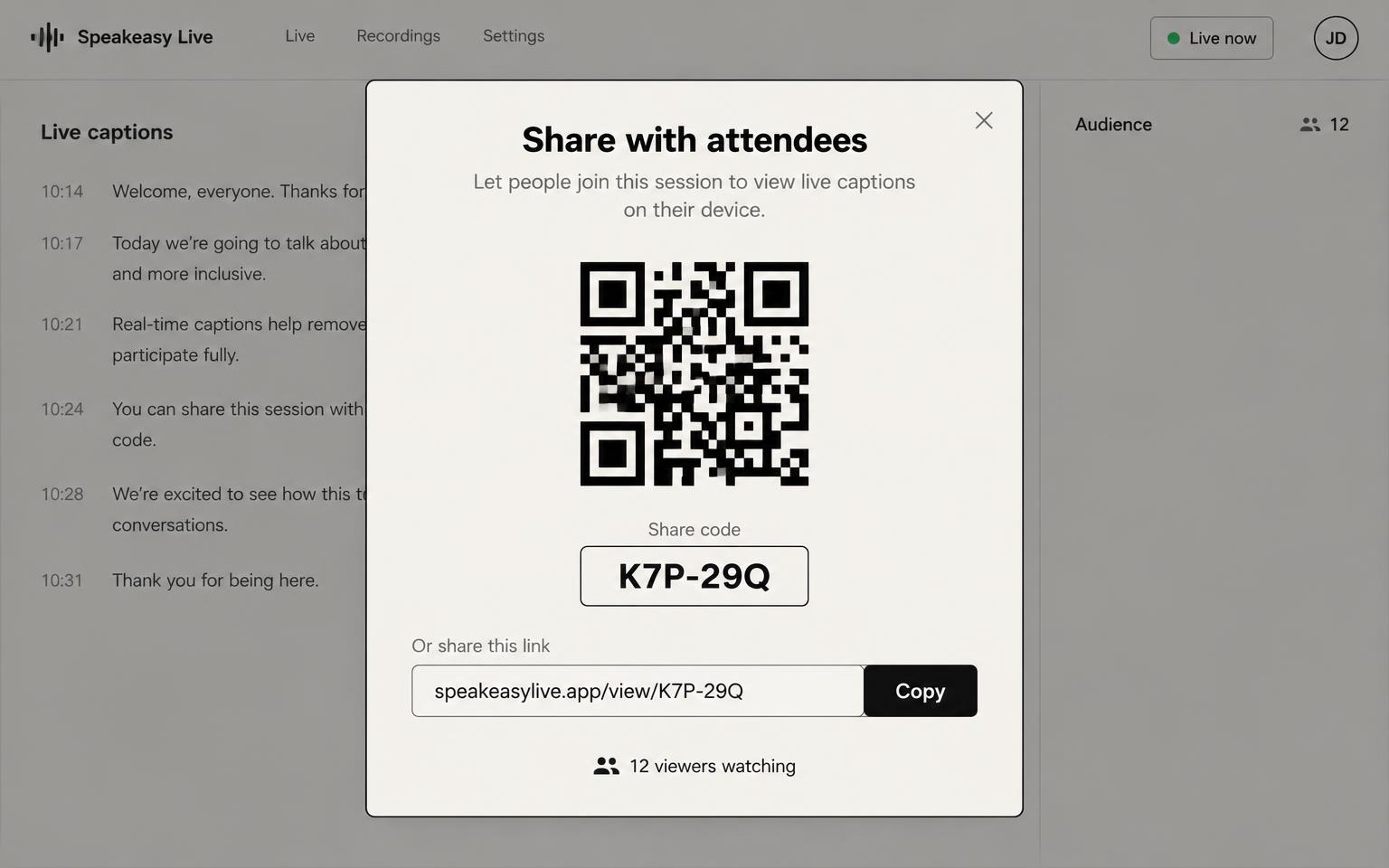
A QR code is ready the moment you open a session. Attendees scan it and read live captions on their phones, with no access code or app.
Plan sessions ahead
Create named sessions with saved languages and layout in advance. Their QR code works before the event starts, so you can print it.
Dual-language summaries
Get an AI summary in both caption languages, regenerate it later from My Sessions, and export transcripts as SRT or plain text.
Readability controls
Change font size, line height, and backdrop opacity so captions stay readable on phones, laptops, or projectors.
Live capture status
See whether audio is coming in, whether silence is detected, and when captions are processing, with an input level meter and mid-session source switching.
All-day and mobile ready
Run 6–8 hour sessions with seamless reconnects and automatic backups. Every control is reachable on a phone.
Private local history
Keep up to 50 sessions in this browser. Transcripts are not stored on our servers, so export what you need before clearing browser data.
Organizer access codes
Issue codes with start and end dates, a total session cap, and a limit on how many sessions may run at the same time.
Simple plans for every event.
Each plan covers a set number of translation sessions you can run at the same time. Every session supports unlimited attendees. Add more sessions whenever you need them.
Event Pass
Best for small workshops, consultations, or 1-on-1 sessions.
- Run up to 2 translation sessions at the same time (e.g. 2 rooms or tracks)
- Unlimited attendees per session
- Additional sessions: HK$70 each
- Valid for a single event date
- All languages & layouts included
Monthly
PopularBest for organizers running several small sessions a month.
- Run up to 2 translation sessions at the same time (e.g. 2 rooms or tracks)
- Unlimited attendees per session
- Additional sessions: HK$60 each
- Use across any events in the month
- Priority support & code management
Yearly
Best valueBest for organizations running events all year round.
- Run up to 2 translation sessions at the same time (e.g. 2 rooms or tracks)
- Unlimited attendees per session
- Additional sessions: HK$50 each
- Use across unlimited events all year
- Save over HK$3,000 vs monthly billing
- Priority support & code management
Pricing shown in Hong Kong dollars. A session is one active live translation stream; attendees joining that stream are unlimited. Contact us for custom event sizes.
Frequently asked questions
How does live translation work?
Speakeasy Live listens through your microphone, a shared browser tab, or both, then sends the audio to an AI model that transcribes and translates as people speak. Captions usually show up within 1-3 seconds. Locking the spoken language helps when speakers switch between languages.
Can I show two languages at the same time?
Yes. Choose a primary and a secondary language and captions appear side by side at the same size, with the newest sentences lined up. Your language choices, source lock, and audio source are saved on this device.
Which languages are supported?
We currently support 78 languages: English, 普通话 (Mandarin), 粵語 (Cantonese), 日本語 (Japanese), 한국어 (Korean), हिन्दी (Hindi), नेपाली (Nepali), اردو (Urdu), Bahasa Indonesia, Tagalog (Filipino), ไทย (Thai), ਪੰਜਾਬੀ (Punjabi), Tiếng Việt (Vietnamese), မြန်မာ (Burmese), Afrikaans, Akan, Shqip (Albanian), አማርኛ (Amharic), العربية (Arabic), Հայերեն (Armenian), Azərbaycan (Azerbaijani), Euskara (Basque), Беларуская (Belarusian), বাংলা (Bengali), Български (Bulgarian), Català (Catalan), Hrvatski (Croatian), Čeština (Czech), Dansk (Danish), Nederlands (Dutch), Eesti (Estonian), Suomi (Finnish), Français (French), Galego (Galician), ქართული (Georgian), Deutsch (German), Ελληνικά (Greek), ગુજરાતી (Gujarati), Hausa, עברית (Hebrew), Magyar (Hungarian), Íslenska (Icelandic), Italiano (Italian), Basa Jawa (Javanese), ಕನ್ನಡ (Kannada), Қазақ (Kazakh), ខ្មែរ (Khmer), Kinyarwanda, ລາວ (Lao), Latviešu (Latvian), Lietuvių (Lithuanian), Македонски (Macedonian), Bahasa Melayu (Malay), മലയാളം (Malayalam), मराठी (Marathi), Монгол (Mongolian), Norsk (Norwegian), فارسی (Persian), Polski (Polish), Português (Brasil), Português (Portugal), Română (Romanian), Русский (Russian), Српски (Serbian), سنڌي (Sindhi), සිංහල (Sinhala), Slovenčina (Slovak), Slovenščina (Slovenian), Español (Spanish), Basa Sunda (Sundanese), Kiswahili (Swahili), Svenska (Swedish), தமிழ் (Tamil), తెలుగు (Telugu), Türkçe (Turkish), Українська (Ukrainian), Oʻzbek (Uzbek), isiZulu (Zulu).
Can it translate a YouTube, Zoom, or other video call?
Yes. Pick Shared tab audio and share the browser tab that is playing the video or call. If Chrome cannot capture sound because it is routed to a Bluetooth speaker, Speakeasy Live can fall back to your microphone automatically.
What is the difference between the demo and an access code?
The demo is a 1-minute trial with no setup. An access code is issued to an organizer and can be limited by dates, total sessions, and how many sessions may run at once. Once unlocked, you stay in the workspace until you choose Quit.
Do attendees need to install an app?
No. Guests open a link in their browser, pick a language, and read captions as they appear. No downloads, accounts, or setup needed.
Can I change how captions look?
Yes. Change font size, line height, and backdrop opacity, or switch between layout presets while you record. Every change takes effect immediately.
How do I know audio is actually being captured?
The capture status panel shows whether audio is coming in, whether silence is detected, and when captions are processing. It also has a live input level meter. You can switch audio sources mid-session without stopping.
Can I save or export a transcript?
Yes. Up to 50 sessions are stored in this browser. After a session you get an AI summary in both of your caption languages, and you can regenerate it later from My Sessions. Download the transcript as plain text or SRT with relative timestamps. Export anything you want to keep, because clearing browser data will delete saved sessions.
Can I see my shared screen while translating?
Yes. When you share a tab, a preview of it appears above the transcript. In fullscreen you can place captions beside or below the screen, resize both, show the attendee QR code, and hide the control bar.
Can I prepare a session and QR code before the event?
Yes. Create named sessions in advance with their languages and layout saved. Each one gets a QR code that works before the event starts, so you can print it or add it to slides.
Is my event audio kept private?
Audio is processed in real time and is not kept after the session ends. Access codes let organizers control who can join the live captions feed, so the event stays limited to invited guests.
Still have questions?
Tell us about your event and we'll send you an access code.